Labtris and containerlab
containerlab has the features people used to come here for: a drag-and-drop topology editor, browser consoles, packet capture, an API server with logins. What it does not have is one thing to install.
For one engineer, containerlab wins and it is not close — one binary, one YAML file, containerlab deploy. For a team it inverts: the shared setup is the API server, Edgeshark, host accounts, and then Wireshark, an extcap plugin and a URL handler on every person’s machine. Labtris is one compose file and a URL you hand out.
So: keep writing .clab.yml. Come here for the shared thing without the assembly, or for what containerlab does not do — native KVM with real snapshots, the cloud emulator your workload calls, P4 dataplanes, an assistant that reads the topology.
Last checked against containerlab 0.79.0, clab-api-server 0.7.0, and the containerlab docs in October 2026. Comparisons go stale; if something here is wrong now, please say so.
What changes if you switch.
The differences worth knowing before reading anything else. The concept map further down answers the other question — where each thing you already use ended up.
- containerlab
- One binary and a YAML file. The fastest way to a running topology, and we do not match it.
- Labtris
- Heavier — a compose file, an ISO, or curl | bash.
- containerlab
- Assembled: containerlab, a privileged API server, Edgeshark, and a GUI client on each person’s machine.
- Labtris
- The same one install. Hand out a URL.
- containerlab
- Yes — a
.clab.ymlis reviewable and reproducible. containerlab’s real advantage. - Labtris
- Weaker. A lab is rows in a database; clone it and apply a named config set. No single file is the lab.
- containerlab
- Only after installing Wireshark, the extcap plugin and a
packetflix://handler on their own machine. - Labtris
- A browser. Wireshark’s own GUI streams from the server.
- containerlab
- vrnetlab or boxen — QEMU inside a container either way. No snapshots, so you cannot freeze a router mid-convergence.
- Labtris
- Native QEMU/KVM, with real savevm/loadvm snapshots.
- containerlab
- Deep and maintained — srl, ceos, xrd, sonic, crpd, with the boot quirks already solved.
- Labtris
- Bring the image and set RAM, NIC model and disk bus yourself. This is the gap.
- containerlab
- Out of scope — it wires nodes, and that is the job.
- Labtris
- A cloud API surface for the lab to call, and an assistant that reads the topology.
Licence is not a difference here: containerlab is BSD-3-Clause and Labtris is MIT, both permissive. Three of the rows above go to containerlab, which is the honest shape of this comparison — it is a CLI, this is a server, and the question is which one your team needs rather than which is better.
Keep using these ideas.
- Declarative topologies in git. A .clab.yml is reviewable, diffable and reproducible in a way a database row is not — containerlab's real advantage, and Labtris does not match it.
- Deep vendor kinds: SR Linux, cEOS, XRd, SONiC, cRPD, plus more than thirty VM-based kinds through vrnetlab or boxen, with the boot quirks already solved.
- A real GUI from the same authors — TopoViewer draws and edits topologies, with consoles and capture — plus an official API server with PAM logins and lab ownership.
- Built for CI, seconds to a running fabric, and a large community with an enormous body of published labs.
The reasons to look elsewhere.
- The shared setup is assembled, not installed — containerlab, a privileged API server, Edgeshark, a GUI client each — and the list grows as the project adds parts.
- Capture needs Wireshark, the cshargextcap plugin and a packetflix:// handler on every client machine. It is the one piece that cannot be solved centrally.
- Virtual machines only through vrnetlab or boxen, both of which run QEMU inside a container. No native QEMU path and no snapshots — you cannot freeze a router mid-convergence.
- Nothing above the network. No cloud API for the lab to call, no assistant that reads the topology — simply not what containerlab is for.
What you know, and what it’s called here.
Same primitives, mostly. A few things are actually different — those get their own row.
- Topology source
- clab
- A .clab.yml you write and version — or draw in TopoViewer, which writes it for you
- Labtris
- A lab in the database, drawn on a canvas — or built over the API/MCP. Import .clab.yml to start from yours.
- Running a .clab.yml
- clab
- containerlab deploy, on that host
- Labtris
- containerlab deploy, on the instance — Labtris spots it and the nodes appear on the canvas by themselves, consoles and all
- Reproducibility
- clab
- Excellent — same file, same lab, every time
- Labtris
- Weaker. Clone a lab and apply a named config set. There is no single file that is the lab.
- Containers
- clab
- The point. Every kind is a container
- Labtris
- First-class, NetworkMode none, veth into the namespace — same kernel mechanism
- Virtual machines
- clab
- vrnetlab or boxen — either way QEMU wrapped in a container. 30+ kinds, no snapshots
- Labtris
- Native QEMU/KVM. No wrapper, no nesting, real savevm/loadvm snapshots
- Vendor NOS kinds
- clab
- Deep and maintained — srl, ceos, xrd, sonic, crpd
- Labtris
- Not yet. Bring the image and set RAM, NIC model and disk bus yourself. This is the gap.
- Links
- clab
- endpoints: [nodeA:eth1, nodeB:eth1]
- Labtris
- Drag a wire, or POST a link. Same veth pair underneath
- Shared segments
- clab
- kind: bridge / ovs-bridge
- Labtris
- A segment object — and a clab bridge imports as one
- GUI
- clab
- TopoViewer — drag and drop editing, in VS Code, a desktop app or a web app you host
- Labtris
- A canvas in the browser, part of the server. Nothing to install per person
- Impairment
- clab
- tools netem set, per interface
- Labtris
- Per link and per direction, from the link's right-click menu
- Consoles
- clab
- Shell and SSH from the GUI, proxied by clab-api-server
- Labtris
- PTY, and — because the VMs are native — serial from the first boot byte, VNC and RDP
- Capture
- clab
- Edgeshark's web UI — but Wireshark, an extcap plugin and a packetflix:// handler on each client
- Labtris
- Right-click a link. Wireshark's own GUI streams from the server, so a viewer needs only a browser
- Users
- clab
- Linux accounts via PAM, gated on the clab_api group; ownership by container label
- Labtris
- Accounts and roles in the app — no host logins to hand out
- API
- clab
- clab-api-server: official, PAM + JWT, HTTPS by default
- Labtris
- REST, plus MCP so an agent can drive the lab directly
- Multi-host
- clab
- Clabernetes: one deployment per node, stitched with point-to-point VXLAN. Needs a k8s cluster (beta)
- Labtris
- The same VXLAN primitive — register a host, drop a segment. Less ambitious, nothing to orchestrate
- CI
- clab
- A first-class use case
- Labtris
- Not aimed at it. The REST API is there, but nothing is built for pipelines
- Above the network
- clab
- Out of scope — it wires nodes, and that is the job
- Labtris
- An AWS API surface to call, and an assistant that can read the topology
- Install, solo
- clab
- One binary, and genuinely the fastest way to a running topology
- Labtris
- Heavier: a compose file, an ISO, or curl | bash. Slower to a first lab
- Install, for a team
- clab
- containerlab + clab-api-server + Edgeshark + host accounts, then a client per person
- Labtris
- The same one install. Hand out a URL
Importing existing topologies.
Run containerlab and the lab appears here by itself. Deploy with the real CLI, unwrapped, against the Docker daemon a Labtris instance drives. Labtris watches that daemon’s events, notices the containers, works out the wiring and builds the lab — running, with working consoles, because those really are the containers clab built. No import step, no wrapper command. A redeploy repoints the same lab; a destroy marks it stopped and keeps it.
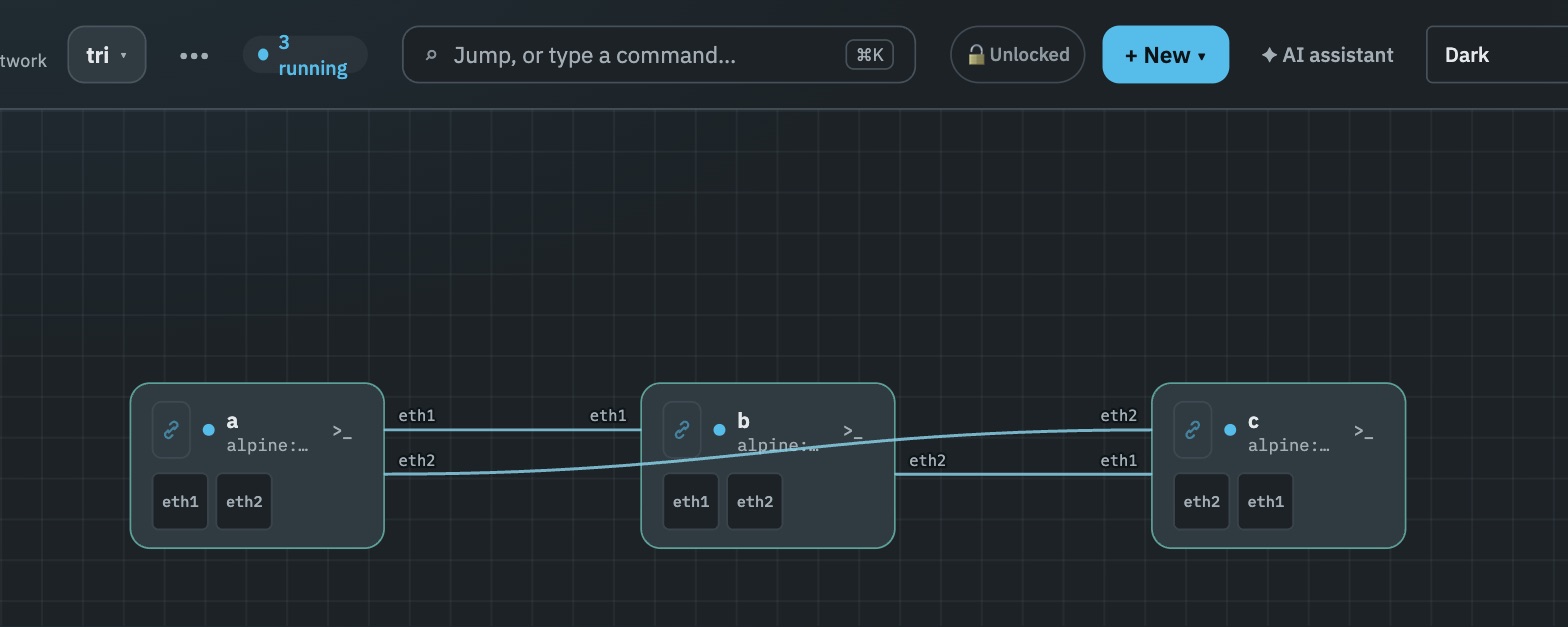
containerlab deploy, with the .clab.yml on a filesystem the server could not read. Labtris found the containers on its Docker daemon, read the wiring out of the veths, and drew all three links. The nodes are clab’s containers, so the terminal buttons open shells inside them.Recovering the links is the interesting part. containerlab records them only in the .clab.yml, which is often on a filesystem the server cannot read, so Labtris reads the dataplane instead: each veth end reports its peer’s index, and two interfaces in two node namespaces that name each other are one cable. That describes what is running rather than what was asked for. The file still wins when readable, because kinds and startup config exist only there.
One constraint: containerlab creates containers over the Docker API but wires them over netlink, as the process on that host. Pointing DOCKER_HOST at Labtris from your laptop gives nodes and no links — the binary has to run where the namespace is.
Pasting a .clab.yml works too. Kind and image inheritance is handled the way containerlab does it, and bridge / ovs-bridge nodes become segments, which is what they always were. But only linux, docker and host map to a runtime today: an nokia_srlinux or arista_ceos node arrives as a placeholder with its kind, image and a warning. You get the shape and the wiring, not a running fabric. Making those kinds first-class is open work.
Edgeshark and Clabernetes.
Edgeshark — Siemens’, not containerlab’s — gives capture a web UI, and it is good. The cost is the handoff: clicking capture emits a packetflix:// URI, so every person needs Wireshark, the cshargextcap plugin and an OS-level URI handler. Tellingly, the VS Code extension works around this with a Wireshark VNC session in a webview. Labtris took that route for everything: Wireshark’s real GUI runs on the server and streams to the browser, so the viewer installs nothing.
Clabernetes splits a topology into one deployment per node, each pod running containerlab in Docker-in-Docker, then stitches them with point-to-point VXLAN tunnels in place of veth pairs. Beta; VM nodes need nested virtualisation on the cluster. It answers a real problem Labtris has no ambition about — a topology bigger than one machine. Worth knowing that the mechanism is the one we use too: our multi-host labs stretch over point-to-point VXLAN. The difference is what must exist first — a Kubernetes cluster, or a second host registered.
Try Labtris.
Private beta: ask for access, install with the token you get back. No telemetry, no lock-in; the code you receive is MIT.